
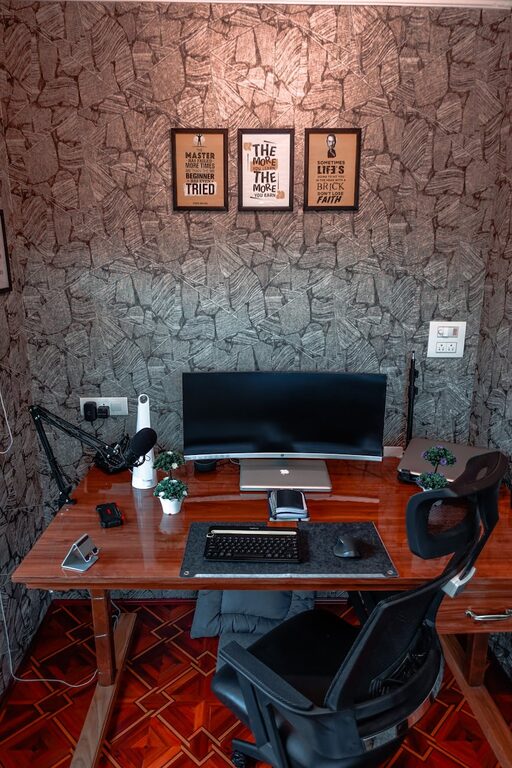
Tips for Creating a Cozy and Functional Home Workspace
Creating a cozy and functional home workspace is essential for maintaining productivity and comfort, especially as many people continue to work or study from home. A well-designed workspace helps you stay focused, reduces stress, and fosters creativity. In this post, we’ll guide you through practical tips to design a workspace that meets your needs while feeling inviting and cozy.
Why a Cozy and Functional Workspace Matters
A workspace should be more than just a desk and chair. It’s a place where you spend hours each day, so it’s important that it supports both your physical comfort and mental focus. A cozy environment can reduce fatigue and encourage positive work habits, while functionality ensures that you have everything you need within easy reach.
—
Step 1: Choose the Right Location
Selecting the perfect spot in your home is the first step. Consider these factors:
– Natural Light: Position your desk near a window if possible. Natural light boosts mood and reduces eye strain.
– Quiet Environment: Find a spot with minimal distractions, away from loud noises or heavy foot traffic.
– Space Availability: Make sure the area can comfortably fit your desk, chair, and storage without feeling cramped.
If space is limited, try creative solutions like using a foldable desk or converting a closet into a mini office nook.
—
Step 2: Invest in Comfortable and Ergonomic Furniture
Comfort is key to avoiding physical strain during long work hours.
– Ergonomic Chair: Choose a chair with adjustable height, proper lumbar support, and comfortable cushioning.
– Desk Height: Your desk should allow you to keep your arms at a 90-degree angle while typing.
– Footrest: If your feet don’t rest flat on the floor, a footrest helps improve posture.
Remember, comfort doesn’t mean sacrificing style. There are many ergonomic furniture options that fit any decor.
—
Step 3: Optimize Lighting
Good lighting reduces eye strain and keeps you alert.
– Layered Lighting: Combine natural light with ambient lighting (like overhead lamps) and task lighting (such as a desk lamp).
– Adjustable Task Light: A desk lamp with adjustable brightness and direction helps illuminate your workspace during dark hours.
– Avoid Glare: Position screens and light sources to avoid reflections that can strain your eyes.
Warm light bulbs tend to create a cozy atmosphere while cooler light mimics daylight and can boost focus.
—
Step 4: Organize Your Workspace for Efficiency
A clutter-free workspace helps you stay focused and feel calm.
– Declutter Regularly: Remove items you don’t use daily.
– Use Storage Solutions: Shelves, drawers, and organizers keep supplies accessible but out of sight.
– Cable Management: Use clips, sleeves, or ties to keep cords tidy and prevent tangles.
– Designate Zones: Separate areas for computer work, writing, and storage to avoid mixing tasks and items.
Labeling containers or shelves can make it easier to find what you need quickly.
—
Step 5: Personalize Your Space
Adding personal touches makes your workspace inviting and motivational.
– Plants: Small potted plants or succulents improve air quality and add a natural element.
– Artwork: Hang inspiring images or prints that make you smile.
– Comfort Items: Include cozy blankets or cushions if you have space.
– Color Choices: Choose calming colors like soft blues or greens, or energizing hues like yellows, depending on your preference.
Be careful not to over-decorate, as too many items can create distraction.
—
Step 6: Incorporate Technology Thoughtfully
Technology is vital but can also create chaos in your workspace.
– Quality Equipment: Invest in good-quality monitor(s), keyboard, and mouse for comfort and efficiency.
– Wireless Devices: Reduce cables with wireless accessories.
– Charging Station: Have a dedicated spot for charging phones and gadgets.
– Backup Tools: Keep essentials like external drives or USB sticks handy but organized.
Make sure your internet connection is reliable to prevent interruptions.
—
Step 7: Establish a Routine and Boundaries
Even the best space needs boundaries to maintain work-life balance.
– Set Work Hours: Define clear start and end times.
– Take Breaks: Use your workspace design to encourage movement, like standing up or stretching.
– Designated Workspace: Avoid working from beds or couches to mentally separate work from relaxation.
If you share your home with others, communicate your schedule and needs to minimize interruptions.
—
Bonus Tips for Small Spaces
If your space is limited, use these ideas:
– Vertical Storage: Use wall-mounted shelves or pegboards.
– Multi-Purpose Furniture: Use desks with built-in storage or fold-down options.
– Light Colors: Lighter colors help make a small area feel bigger.
– Mirrors: Strategically placed mirrors can reflect light and open up the space.
—
Conclusion
Creating a cozy and functional home workspace doesn’t have to be complicated or expensive. Focus on comfort, good lighting, organization, and personalization to build a space that motivates and supports your daily tasks. With these tips, your home office can become a favorite place to work, learn, and be productive.
Remember, your workspace should work for you. Feel free to adapt these tips to match your preferences and lifestyle. Happy designing!
